This Blog has Moved

This blog has moved to www.allyplm.com/blog

To stay up-to-date with the latest news, tips and tricks, product enhancements and maintenance packs for Siemens PLM Software solutions, visit our new site!

For resources for specific products, you can navigate directly to the product resource page:
... and more!
Showing posts with label SolidWorks. Show all posts

Friday, May 1, 2015

Tip of the Week May 1


Solid Edge Tip of the Week
May 1, 2015

Solid Edge - Importing SolidWorks Part and Assembly Files
in Solid Edge

There are several options you can pick in order to open the SolidWorks model files in Solid Edge.

Option 1:  
File > Open Dialogue Box 


Option 2:
  • Batch Converter
  • Location:  C:\Program Files\Solid Edge ST7\Custom\Batch\Bin
Run Batch.exe file > select the folder. This option will convert all the SolidWorks files in a specified directory (use Browse to Folder to specify the folder) 


Option 3:
Use SolidWorks Data Migration - you need a seat of SolidWorks in order to run this tool 


Navjot Gill
Application Engineer
Ally PLM Solutions, Inc.

Want more tips? Sign up HERE to receive our Tip of the Week.


Register for upcoming free Solid Edge webinars or learn more about Ally PLM Solutions.

Tuesday, December 10, 2013

Review of Migration from SolidWorks to Solid Edge ST6


CAD specialist Jeffrey Heimgartner recently reviewed Solid Edge ST6 and focused on its ability to mass-migrate from SolidWorks. ST6’s Bulk Data Migrator, which was expanded with the update, is designed to help make the transition from SolidWorks to Solid Edge seamless – or to make it possible for users of Solid Edge to work with clients who may still use SolidWorks or other MCAD systems.


ST6 boasts that the Bulk Data Migrator “simplifies migration of competitive data to speed adoption of a stable CAD platform while protecting intellectual property.” Heimgartner put these claims to the test and found a number benefits in the migration process. 

Getting Started Resource Library. ST6 has a SolidWorks Migration Wizard (and also wizards for other MCAD solutions) with an associated resource library that provides excellent technical support.

 Specific and fast transfer process. Before transfer begins, the wizard gives you an option to save changes made to the configuration file to be saved to the existing or a new file. As the migration runs, SolidWorks opens up and cycles through each part and saves them as a DXF file. Heimgartner found that the migration of 30+ files took under 10 minutes. 

 Customizable interface. ST6 has a customizable interface which can be modified to be very similar to SolidWorks, making for a much shorter learning curve. The Command Finder is also available, which allows former SolidWorks users to type in commands from SolidWorks to find the Solid Edge equivalent. 

These are just three of the time and cost savings benefits associated with Solid Edge ST6 and the transfer process from SolidWorks, or another MCAD solution. The ability to transfer CAD data from one system to another can be extremely costly and frustrating, but the Bulk Data Migrator in Solid Edge ST6 provides a cost-effective and user-friendly way to do so. Heimgartner concluded, “I think Solid Edge has done a good job of creating tools that give companies the ability to [re-use existing data].” For more information on Solid Edge ST6, visit Ally PLM's website. 


Bridget Hatfield
Ally PLM Solutions


Thursday, September 12, 2013

Former SolidWorks user wins competition with NX

Christer Oldeide uses NX, wins student design competition


Winning Image Designed In NX
Congratulations to Christer Oldeide, a winner of Siemens PLM Software Student Design Contest.  Christer used NX™ software to design his winning idea.
Christer Oldeide is currently studying Mechanical Engineering, Product Development and Manufacturing at the Norwegian University of Science & Technology. Students were assigned a project to make an electric screwdriver that was inexpensive and suitable for putting together flat pack furniture. Christer came up with the idea of combining a screwdriver and hammer as one. His aim was to make it small and compact and very easy to use.
Christer chose to use NX software to design his winning idea. Previously Christer was a SolidWorks user. His university has various CAD packages including NX which is part of the Siemens PLM Software academic program. He decided to use NX for this project. After taking a little time to get used to the software, his only real challenge was learning how to use surface modulation. Christer used NX fairly comprehensively on the assignment, including the various features and functions that are part of the NX academic bundle such as extrude, revolve, emboss, through curve mesh, scale and edge blend. His favorite aspect of NX was unite/subtract and trim body. He said that NX is a quality software tool –”and it never crashed!”.
Christer was impressed with NX and said that he would recommend it to other students. “NX is amazing. After I learned how to use the function, expressions, the program is even better. When I graduate I hope that I can continue to use NX.”
Read a case study to learn more about his school, the university’s engineering programs and the other Siemens software they are using.
See more winning images and information on how students can participate on our Student Design Contest Winners webpage.  For more information on NX, visit here, or a free trial, visit here

Thursday, September 6, 2012

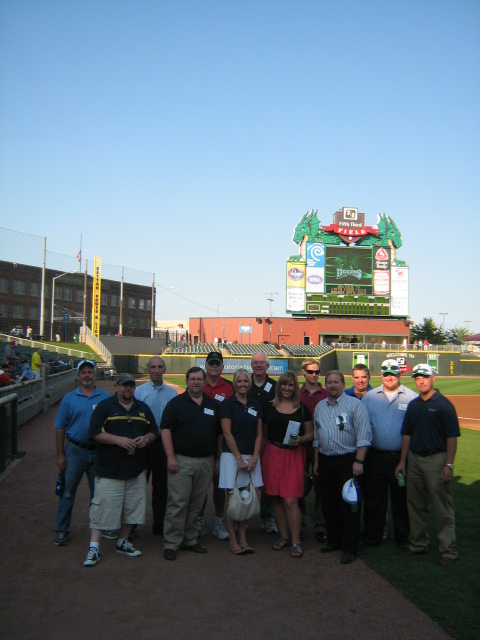
Ally PLM at Fifth Third Field

Fifth Third Field and The Dayton Dragons welcome Ally PLM Solutions!


Ally PLM is hosting a series of free informational events for Dassault Systemes SolidWorks users to talk about future development of the software and issues surrounding the kernel change. The events are free and consist of an hour presentation at the stadium from the SolidWorks Bible author Matt Lombard, immediately followed by the ball game - tickets courtesy of Ally PLM. Matt's knowledge, publishings, honest approach, and long-time history using the software make him a go-to resource in the SolidWorks community.

Last Thursday (August 30, 2012) we kicked off the first of our 3 events in Dayton, OH at Fifth Third Field with the Dayton Dragons. Be sure to join us on September 20 at PNC Park with the Pittsburgh Pirates or September 21 in Cincinnati for the last Friday night game at Great American Ball Park.

From Matt Lombard following the presentation:
"At least one of the SolidWorks users thought the main premise of the talk (Kill SolidWorks, long live Catia Lite) was beyond belief, and went to their reseller to ask. The response from the reseller was that the Catia-based product will be available in 2014, and that the data transition will be “seamless”. (They’re resellers, what do you want them to say?) Basically confirming the new direction. I’ve heard elsewhere that the new software will be shown at SolidWorks World 2013."

Get Informed:

See if the new direction of SolidWorks really makes sense for you, and determine if your CAD tools and data are at high-risk. Have the rare opportunity to network with a nationally-recognized SolidWorks authority at the baseball game while you're at it. We hope you can join us.

Get details or register for our upcoming events with the Cincinnati Reds or Pittsburgh Pirates at www.allyplm.com/solidworks. 

Related Articles:

See photos from our first event below:

VIP Tour of Fifth Third Facilities

Ally PLM Senior Application Engineer Brandon Carter and Marketing Director Gina Yeagley

The group on the field just before the game

Gina Yeagley
Marketing Director
Ally PLM Solutions