Start off the new year by ordering your FREE Siemens 2014 Calendar from Ally PLM. This years calendar features projects from Siemens software users all over the world!
To reserve yours, click here.
Tracy Tijan
Ally PLM Solutions
This Blog has Moved
This blog has moved to www.allyplm.com/blog
To stay up-to-date with the latest news, tips and tricks, product enhancements and maintenance packs for Siemens PLM Software solutions, visit our new site!
For resources for specific products, you can navigate directly to the product resource page:
- NX CAD
- NX CAM
- NX CAE
- Femap
... and more!
Showing posts with label Unigraphics. Show all posts
Monday, December 30, 2013
Tuesday, November 19, 2013
Elevator maker uses multiple Siemens PLM Software solutions to develop products
Shanghai Edunburgh Elevator Company Ltd (Edunburgh Elevator) takes on manufacturing, sales, research and development, and installation and maintenance of elevators, escalators and car parking equipment. Recently, Edunburgh faced a variety of product development issues in areas like engineering change management, design analysis, R&D, and collaboration. In order to deliver quick and accurate quotes in a highly competitive market, Edunburgh sought after 3D computer-aided design software and simulation technology. In order to fulfill their customer requirements, these technologies would look to exponentially improve their product development processes.
Edunburgh Elevator chose product lifecycle management specialist Siemens PLM Software to address their issues. Solid Edge and FEMAP with NX Nastran were chosen by Mao Zhongwei of Edunburgh Elevator. Elevators feature sheet metal processing and partial assembly with complex product configurations, product design efficiency factors and a high degree of customization that impact R&D on new products.
Chief engineer of R&D at Edunburgh Elevator Mao Zhongwei is quoted: “For many years, our company has applied 2D CAD software for product design. Engineers normally start the product design process after receiving customer orders and confirming requirements. Our older designers are generally accustomed to using 2D CAD. While it is possible to handle a small quantity of orders using 2D software to draft product drawings, the downside of using 2D software becomes increasingly apparent as the workload grows. To make even the smallest alteration to a design, such as changing a dimension from 2 to 3 millimeters, sometimes we had to go back to the very beginning for redrafting. Plus, when designing a new part, the impact of a change on a design could not be readily understood. Designers would have to build a physical prototype first and then change the design based on the prototype. Then they would make another physical prototype for verification. This repetitious process led to a long design cycle."
Zhongwei went on to say that "Without a uniform 3D design platform, it was common for engineers to have difficulty communicating with each other, especially because they used diverse design platforms. As a result, our prior process sometimes seriously delayed order delivery. The unique capabilities of synchronous modeling helped us cut two months off the new product R&D cycle, from 1 year to about 10 months, this significant improvement in product development efficiency has given our engineers greater freedom to explore innovative design ideas and improve product quality, and we are seeing the results. The use of Femap with NX Nastran clearly improves design verification. Compared with our prior approach, when design verification was conducted using physical prototypes, we can now evaluate a virtual assembly and immediately conduct program evaluation and design optimization. This has reduced costs and material waste by 18 percent.”
Information director at Edunburgh Elevator, Wang Ke states: “The R&D challenges we faced continued to grow, making it apparent to management that 2D CAD software could no longer meet our design requirements, nor could 2D serve to effectively facilitate engineering innovation. We urgently needed to upgrade to a common 3D design platform to bring about a meaningful and compelling product development process transformation. Considering our needs and Siemens PLM Software’s reputation for outstanding design, engineering and manufacturing software, we chose Solid Edge with its powerful synchronous technology capabilities and Femap with NX Nastran for early and effective simulation and analysis."
Ke also mentioned "Solid Edge is easy to operate and provides exceptional design functionality, especially synchronous technology, which makes it easy to edit design models created using other 3D software systems. Such re-use of previous design models, after simply changing certain parametric information, greatly simplifies our design work and notably boosts productivity. The use of Solid Edge has helped optimize our product design and manufacturing business processes,” says Ke. “Our employees are delivering faster, better results, enabled by smarter decision-making. We have a very positive atmosphere inside the company regarding our technological solutions and business strengths. We are now working with Shark Networking on delivering a quick configuration capability for complex products. We plan to further improve our customer responsiveness, and with this enhancement, we envision a new round of rapid growth.”
Chief engineer of R&D at Edunburgh Elevator Mao Zhongwei is quoted: “For many years, our company has applied 2D CAD software for product design. Engineers normally start the product design process after receiving customer orders and confirming requirements. Our older designers are generally accustomed to using 2D CAD. While it is possible to handle a small quantity of orders using 2D software to draft product drawings, the downside of using 2D software becomes increasingly apparent as the workload grows. To make even the smallest alteration to a design, such as changing a dimension from 2 to 3 millimeters, sometimes we had to go back to the very beginning for redrafting. Plus, when designing a new part, the impact of a change on a design could not be readily understood. Designers would have to build a physical prototype first and then change the design based on the prototype. Then they would make another physical prototype for verification. This repetitious process led to a long design cycle."
Zhongwei went on to say that "Without a uniform 3D design platform, it was common for engineers to have difficulty communicating with each other, especially because they used diverse design platforms. As a result, our prior process sometimes seriously delayed order delivery. The unique capabilities of synchronous modeling helped us cut two months off the new product R&D cycle, from 1 year to about 10 months, this significant improvement in product development efficiency has given our engineers greater freedom to explore innovative design ideas and improve product quality, and we are seeing the results. The use of Femap with NX Nastran clearly improves design verification. Compared with our prior approach, when design verification was conducted using physical prototypes, we can now evaluate a virtual assembly and immediately conduct program evaluation and design optimization. This has reduced costs and material waste by 18 percent.”
Information director at Edunburgh Elevator, Wang Ke states: “The R&D challenges we faced continued to grow, making it apparent to management that 2D CAD software could no longer meet our design requirements, nor could 2D serve to effectively facilitate engineering innovation. We urgently needed to upgrade to a common 3D design platform to bring about a meaningful and compelling product development process transformation. Considering our needs and Siemens PLM Software’s reputation for outstanding design, engineering and manufacturing software, we chose Solid Edge with its powerful synchronous technology capabilities and Femap with NX Nastran for early and effective simulation and analysis."
Ke also mentioned "Solid Edge is easy to operate and provides exceptional design functionality, especially synchronous technology, which makes it easy to edit design models created using other 3D software systems. Such re-use of previous design models, after simply changing certain parametric information, greatly simplifies our design work and notably boosts productivity. The use of Solid Edge has helped optimize our product design and manufacturing business processes,” says Ke. “Our employees are delivering faster, better results, enabled by smarter decision-making. We have a very positive atmosphere inside the company regarding our technological solutions and business strengths. We are now working with Shark Networking on delivering a quick configuration capability for complex products. We plan to further improve our customer responsiveness, and with this enhancement, we envision a new round of rapid growth.”
Thursday, September 19, 2013
Ducati recognizes measurable benefits with an NX and Teamcenter solution
Ducati
motorcycles are regarded as some of the most attractive and powerful in the
world. Their intricate Italian design and high performance standards sets them apart
from all other machines. They produce approximately 40,000 bikes each year,
which are sold in more than 60 countries. Of the 90 engineers that are employed
by Ducati, 60 are dedicated solely to design.
![]() |
| Ducati Streetfighter |
Ducati chose a PLM suite from
Siemens PLM which included NX (Unigraphics) for design and Teamcenter for their
data management. Since implementing this combination, they have reported a
reduced development time by more than a year, reporting a reduced design and
development cycle time from between 36 to 40 months to just 24 months.
NX has provided a great degree of
flexibility for Ducati designers. Synchronous Technology from NX creates a hybrid
approach, giving the user full range on deciding how to achieve the final
result and providing flexibility in generating 3D models with different
methods. Seamless sharing of data throughout the entire cycle supports an
integrated approach throughout all processes, which significantly reduces
cost and error.
Teamcenter has also provided
several benefits which support significantly reduced cycle times. As the
need to share model data is increasing, Ducati has experienced even closer
collaboration with both the internal development team as well as with external
suppliers. Teamcenter allows designers to work in parallel with these external
suppliers, eliminating lag time in the cycle. “We couldn't imagine working
without Teamcenter,” commented Piero Gusti, IT Manager for R&D at DucatiMotor Holding.
![]() |
| Ducati uses more that 50+ NX workstations and 250 Teamcenter workstations |
Ease of adoption, a short learning
curve, seamless data sharing, and a high degree of data security were some of the
other benefits reported by Ducati, in addition to a shorter cycle time. Gusti
continued, “In the past, it used to take 6 to 12 months before accessories were
marketed. Now they are ready together with the bike, generating significant sales
synergies.”
To learn more about how Ducati leveraged
a custom NX (Unigraphics) and Teamcenter solution from Siemens PLM, click here.
You can learn more about solutions from NX and Teamcenter by clicking the links
below.
Bridget Hatfield
Ally PLM Solutions
Thursday, September 12, 2013
Former SolidWorks user wins competition with NX
Christer Oldeide uses NX, wins student design competition
Congratulations to Christer Oldeide, a winner of Siemens PLM Software Student Design Contest. Christer used NX™ software to design his winning idea.
Christer Oldeide is currently studying Mechanical Engineering, Product Development and Manufacturing at the Norwegian University of Science & Technology. Students were assigned a project to make an electric screwdriver that was inexpensive and suitable for putting together flat pack furniture. Christer came up with the idea of combining a screwdriver and hammer as one. His aim was to make it small and compact and very easy to use.
Christer chose to use NX software to design his winning idea. Previously Christer was a SolidWorks user. His university has various CAD packages including NX which is part of the Siemens PLM Software academic program. He decided to use NX for this project. After taking a little time to get used to the software, his only real challenge was learning how to use surface modulation. Christer used NX fairly comprehensively on the assignment, including the various features and functions that are part of the NX academic bundle such as extrude, revolve, emboss, through curve mesh, scale and edge blend. His favorite aspect of NX was unite/subtract and trim body. He said that NX is a quality software tool –”and it never crashed!”.
Christer was impressed with NX and said that he would recommend it to other students. “NX is amazing. After I learned how to use the function, expressions, the program is even better. When I graduate I hope that I can continue to use NX.”
Read a case study to learn more about his school, the university’s engineering programs and the other Siemens software they are using.
See more winning images and information on how students can participate on our Student Design Contest Winners webpage. For more information on NX, visit here, or a free trial, visit here
Thursday, August 1, 2013
Former GM employee designs wood furniture in Solid Edge
Ed Stuckey has always had a passion for building furniture, as he took 3 years of woodworking in his Canadian high school. He became interested in period furniture because of the traditional design and how the pieces were built in the 18th century with hand tools only.
For almost half of his career, he was a NC (numerical control) Programmer, and was trained on NX (Unigraphics). Learning both the CAD and CAM sides of the program, he wanted to use his knowledge to start building 18th century American furniture reproductions.
Ed was formerly employed by General Motors Technical Center - Chevrolet Engineering. He served a 4-year apprenticeship to become a journeyman wood pattern maker. A wood pattern maker creates wooden patterns for sand-casting iron and other metals. It is a skilled trade intertwined with tool, die and mold making, and incorporates elements of fine woodworking. Ed Stuckey is now a retired wood pattern maker, and has been building these wonderful, wooden masterpieces for 40 years now.
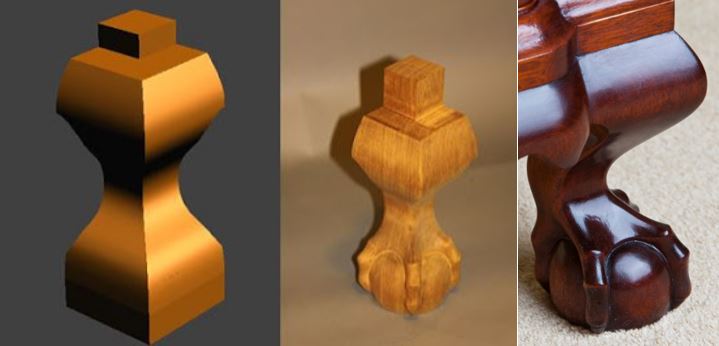
Ed is a member of the Society of American Period Furniture Makers, a national organization of professional and amateur wood workers dedicated to preserving the hand-crafted skills of 18th and 19th century cabinet makers. The pictures on the right show his process from start to finish, this of the front right leg.
After retiring in 2004, Ed bought Solid Edge v18, and is currently using ST6 to design his furniture. He decided that because of the similarities between NX and Solid Edge, he was comfortable with his decision to move to Solid Edge.
In order to begin his design phase, he would research the piece of furniture by going to a museum or by perusing through books that have collections of furniture. To obtain the correct dimensions from the pictures, Ed would use formulas to scale the pictures to the correct dimensions. The picture on the right shows the chest of drawers, by John Chipman (1746-1819), found in the 1987 book Treasures of State.

Once he gathers all the information, he goes into Solid Edge to create the 3D models. From the 3D model, he generates the drawing with all the essential details. The full workshop in his basement paired with his own 36" plotter allows him to make prints of the furniture. All of the pictures on the right were taken by Ed himself.
From start to finish, Ed Stuckey will spend approximately one year on each project. Primary woods used are Mahogany, Walnut and Cherry, with secondary woods being poplar and pine for the drawer sides and bottoms, and internal case construction. The brasses are copies of 18th century brasses.
The block front Chest of Drawers was originally built by John Chipman of Salem, Massachusetts in 1775, and is currently on display at the Diplomatic Reception Rooms of the US Department of State. The chest that Ed built is made of Mahogany as the primary wood, and poplar as the secondary wood.
Here's a 2D picture of his drawer compared to his finished product, and what the base of the chest looks like in Solid Edge compared to what Ed Stuckey pulls out and creates in his shop.
Tim Larsen
Marketing Manager
Ally PLM Solutions Inc
For almost half of his career, he was a NC (numerical control) Programmer, and was trained on NX (Unigraphics). Learning both the CAD and CAM sides of the program, he wanted to use his knowledge to start building 18th century American furniture reproductions.
Ed was formerly employed by General Motors Technical Center - Chevrolet Engineering. He served a 4-year apprenticeship to become a journeyman wood pattern maker. A wood pattern maker creates wooden patterns for sand-casting iron and other metals. It is a skilled trade intertwined with tool, die and mold making, and incorporates elements of fine woodworking. Ed Stuckey is now a retired wood pattern maker, and has been building these wonderful, wooden masterpieces for 40 years now.
Ed is a member of the Society of American Period Furniture Makers, a national organization of professional and amateur wood workers dedicated to preserving the hand-crafted skills of 18th and 19th century cabinet makers. The pictures on the right show his process from start to finish, this of the front right leg.
After retiring in 2004, Ed bought Solid Edge v18, and is currently using ST6 to design his furniture. He decided that because of the similarities between NX and Solid Edge, he was comfortable with his decision to move to Solid Edge.
In order to begin his design phase, he would research the piece of furniture by going to a museum or by perusing through books that have collections of furniture. To obtain the correct dimensions from the pictures, Ed would use formulas to scale the pictures to the correct dimensions. The picture on the right shows the chest of drawers, by John Chipman (1746-1819), found in the 1987 book Treasures of State.
Once he gathers all the information, he goes into Solid Edge to create the 3D models. From the 3D model, he generates the drawing with all the essential details. The full workshop in his basement paired with his own 36" plotter allows him to make prints of the furniture. All of the pictures on the right were taken by Ed himself.
From start to finish, Ed Stuckey will spend approximately one year on each project. Primary woods used are Mahogany, Walnut and Cherry, with secondary woods being poplar and pine for the drawer sides and bottoms, and internal case construction. The brasses are copies of 18th century brasses.
The block front Chest of Drawers was originally built by John Chipman of Salem, Massachusetts in 1775, and is currently on display at the Diplomatic Reception Rooms of the US Department of State. The chest that Ed built is made of Mahogany as the primary wood, and poplar as the secondary wood.
Here's a 2D picture of his drawer compared to his finished product, and what the base of the chest looks like in Solid Edge compared to what Ed Stuckey pulls out and creates in his shop.
| Drawers |
| Base |
Tim Larsen
Marketing Manager
Ally PLM Solutions Inc
Thursday, February 21, 2013
How to fix Java Error for NX 8.5 Product Template Studio
For those of you that have a license of NX Product
Template Studio, you may come across a Java error when you upgrade to NX
8.5. With NX 8.5, Java (Java Runtime
Environment) is no longer delivered with the NX installation package. This could also affect a few other functions
that are listed at the bottom of this article.
3. Click
on Siemens NX 8.5.
To Launch Product Template Studio (PTS) and see if
you get the Java error (Remember you must have the license to access PTS):
1. Click your Windows Start Button.
2. Click on All Programs.
1. Click your Windows Start Button.
2. Click on All Programs.
4. Click on NX Tools.
5. Click
on Product Template Studio.
If you receive the error below, you need to load
Java. This is looking for an Environment
Variable location for Java called “UGII_JAVA_HOME”.
To Fix the PTS Launch Error:
1. Download and install Java. (Java is a free tool. If you are required to, contact your administrator before you download Java.)
a. Go to www.java.com
b. Click on Downloads
c. Click See All Java Downloads. We want to make sure we get the correct version (64 bit vs. 32 bit).
d. Click on the proper version, download, and install.
2. Create a System Environment Variable pointing to the new Java installation.
a. Right click on Computer - Click on Properties for Windows 7.
b. Click on Change Settings.
c. On the Advanced Tab tool, click on Environment Variables.
d. Under System Variables, click New.
e. Type in the Variable name "UGII_JAVA_HOME" and for the value place the path to your Java Installation as shown below.
f. Click OK. Click OK to dismiss the Environment Variable dialog.
3. Try and Launch Product Template Studio again. Your Java error should be gone now.
Here is a list of other areas where this Java fix/installation may be required for NX 8.5:
- NX Relations Browser
- Product Template Studio
- Command line version of CATIA V4 translator
- Command line version of CATIA V5 translator
- Command line version of DXF/DWG
- Command line version of IGES translator
- Command line version of NX Pro E translator
- Command line version of Step AP203 translator
- Command line version of Step AP214 translator
- Knowledge Fusion ICE
- Quality Dashboard
- Validation Rule Editor
- Batch Mesher
- Custom written NX/Open Java programs
If you would like more information on Product
Template Studio contact Ally PLM Solutions at www.allyplm.com/contact. To learn
more about NX knowledge re-use and Product Template Studio view
this brochure.
Brandon
Carter
Senior
Application Engineer
Ally
PLM Solutions
Friday, November 16, 2012
Upcoming NX (Unigraphics) User Group Meeting in Cincinnati, OH
The Western Ohio and Northern Kentucky Regional Meeting for NX (Unigraphics) and Teamcenter users is set to take place on December 4, 2012 in Loveland, OH just northeast of Cincinnati.
When and Where:
December 4, 2012 at 7:30AMOasis Conference Center
902 Loveland-Miamiville Road
Loveland, Ohio 45140
What to Expect:
Through networking, NX and Teamcenter users share best practices and techniques for implementing and using the software more effectively. All of the sessions have been developed with the goal of providing immediate business value to you as a consumer of Siemens PLM NX Software products. The sessions will be a mix of high quality technical and training sessions and provide an excellent opportunity to network with other users and members of Siemens PLM NX team.
The sessions will share tips and techniques,
best practices, and implementation and integration ideas. Siemens PLM Software
will discuss and demonstrate key NX product features and enhancements available
in both NX and in the newest release of NX.
Why You Should Attend
- Enhance your knowledge and stay up to date with the software
- Help improve productivity by networking with other users
- Learn about the new tools that can help improve your business
Registration Info:
You can sign up and register for this meeting at: http://www.plmworld.org/wo_nkevent
Gina Yeagley
Marketing Director
Ally PLM Solutions
Labels:
Cincinnati,
NKY,
NX,
Ohio,
Teamcenter,
UG,
UGS,
Unigraphics,
User Group
Monday, November 12, 2012
NX 7.5.5 Maintenance Pack 7 Is Now Available for Download
NX 7.5.5 - Maintenance Pack 7 Announcement:
The latest Maintenance Pack (MP7) for NX 7.5.5 is now available for
download.
You can download the Maintenance Pack here: http://ftp.ugs.com/unigraphics/maintenance-packs/nx75/
A valid WebKey account is needed to access Maintenance Pack downloads. To create a WebKey you need your Customer
Sold-To ID and your WebKey Access Code, both found under Help, About. You can create your WebKey account here: https://plmapps.industrysoftware.automation.siemens.com/webkey/
Installing Maintenance Packs is quick and easy. Some known security issues
arise with installing any software on Windows 7 OS regarding User Access
Control (UAC); these same issues exist when installing MPs. Windows UAC should be turned off and after
unbundling the download run the .exe as administrator by right mouse clicking
on the file and selecting Run as Administrator from the quick menu. Most UAC
security issues can be avoided by installing Solid Edge to a location on the
client machine anywhere other than the default “Program Files” folder. As long as the user has full write permission
to a folder location such as C:\NX\ these issues should not arise.
Ally PLM encourages all of our customers to stay current with released
Maintenance Packs. Maintenance Packs
deliver the most current updates and resolution of PRs to your software
platform. You can find detailed
information regarding the PRs that a Maintenance Pack addresses in the “readme”
.txt file found with the MP download.
The Ally PLM Technical Support Team is available to answer any questions
and provide support for all of your needs; including Maintenance packs. You can contact the Ally PLM Technical
Support Team via email at technical.support@allyplm.com
or via phone at (513)
984-0480 Option: 4
Matt Johnson
Application Engineer
Ally PLM Solutions
Wednesday, October 24, 2012
What's New in NX 8.5
Be sure to check out the below webinars for NX 8.5 as they become available.
- What's New in NX 8.5 Design - Watch this On Demand Webinar Now
Siemens PLM Resources:
- NX 8.5 for Design
- NX 8.5 for Manufacturing
- NX 8.5 for Simulation
- Siemens PLM Blog - Posts Tagged with NX 8.5
How to Download NX 8.5

NX 8.5 is now available for download. The full product download is available on the Siemens PLM FTP Server for
Windows (32 and 64-Bit), Linux (64-Bit), and Mac OS platforms.
Here’s how to download NX 8.5.
1. You
MUST have a valid WebKey account.
a. Enter
your Webkey Username and Password
3. In
the Full Product Releases category, select “All Siemens PLM Products,” or the
blue “Product Download” button.
a. Select
NX/Unigraphics to return a list of the available platforms of the new release.
b. Expand
the appropriate platform (Windows, Linux, Mad) to see a list of products and
the links to the documentation
4. Downloading
NX 8.5 Software
a. Right
Click on NX 8.5.0 Product Link, Select Save Target As and save the file to your
local destination
5. Downloading
NX 8.5 Documentation
a. Expand
the documentation link – right click on nx-ugdoc-8.5.0 and Save Target as to
your local destination.
If you have any problems, you can access the What’s New help topic from GTAC with this link. Please feel free to direct any questions to the Ally PLM Technical Support team at technical.support@allyplm.com.
Gina Yeagley
Marketing Director
Ally PLM Solutions
Wednesday, October 10, 2012
How to add additional sold to on an existing webkey
Do you have several Siemens PLM Software products such as Solid Edge and FEMAP -- but don't see all your Sold To numbers when you log into the Siemens site? Here is how to add them so you get access to all the updates and information for all your products.
1. Go to support.ugs.com → license management → current
licenses
2. Once you log in with your WebKey look at the top left side for your Sold-To/Install
3. You will see right under the S/T it says Add Sold-To/Install to WebKey, click that
4. click add a SoldTo/Install, there you will enter the S/T #
and web access code.
Email technical.support@allyplm.com with any questions.
Madison Rye
Application Engineering Manager
Ally PLM Solutions
Email technical.support@allyplm.com with any questions.
Madison Rye
Application Engineering Manager
Ally PLM Solutions
Tuesday, September 25, 2012
All new resources loaded with Solid Edge and NX (Unigraphics) tutorials
We would like to introduce our latest in web development at Ally PLM bringing you new video channel resources for Solid Edge and NX (Unigraphics) software. These clean, user-friendly, and searchable video channels are loaded with tutorials, tips, tricks, overviews, case studies, the newest product enhancements, and more.
New tutorials will be added monthly to each channel, and future topic suggestions are welcome and encouraged by contacting us. Both channels feature a Posts RSS feature in the upper right to add notifications right to your web browser (no more e-mails) when new videos are posted.
The links can be found in the top navigation bar of our blog or below.
Ally PLM Solid Edge Video Channel
Ally PLM NX (Unigraphics) Video Channel
How to Navigate
Categories are listed on the right side of the video channel. Click any category and it will generate the videos relevant to the category. Be sure to check out the "Lunch Bytes" for the newest tutorials and past replays from the Ally PLM Application Engineering staff.
Below the Categories is a post Archive including titles of each video posted which is in a hierarchy format and easy to find what you want.
To make things even easier, in the upper right, the search feature searches everything on the channel. Say you want to see all of the videos we have about Solid Edge ST3. Simply type "Solid Edge ST3" in the upper right, and any video we have in Solid Edge ST3 will generate. You can also search modeling specific features such as Drafting, Mold Tooling, Translators, etc.
New tutorials will be added monthly to each channel, and future topic suggestions are welcome and encouraged by contacting us. Both channels feature a Posts RSS feature in the upper right to add notifications right to your web browser (no more e-mails) when new videos are posted.
The links can be found in the top navigation bar of our blog or below.
Ally PLM Solid Edge Video Channel
Ally PLM NX (Unigraphics) Video Channel
How to Navigate
Categories are listed on the right side of the video channel. Click any category and it will generate the videos relevant to the category. Be sure to check out the "Lunch Bytes" for the newest tutorials and past replays from the Ally PLM Application Engineering staff.
Below the Categories is a post Archive including titles of each video posted which is in a hierarchy format and easy to find what you want.
To make things even easier, in the upper right, the search feature searches everything on the channel. Say you want to see all of the videos we have about Solid Edge ST3. Simply type "Solid Edge ST3" in the upper right, and any video we have in Solid Edge ST3 will generate. You can also search modeling specific features such as Drafting, Mold Tooling, Translators, etc.
![]() |
Feedback and suggestions are always welcome as we stride in continuing to provide valuable and current technical resources for Siemens PLM Software users. Gina Yeagley
Marketing Director
Ally PLM Solutions
|
Subscribe to:
Posts (Atom)